

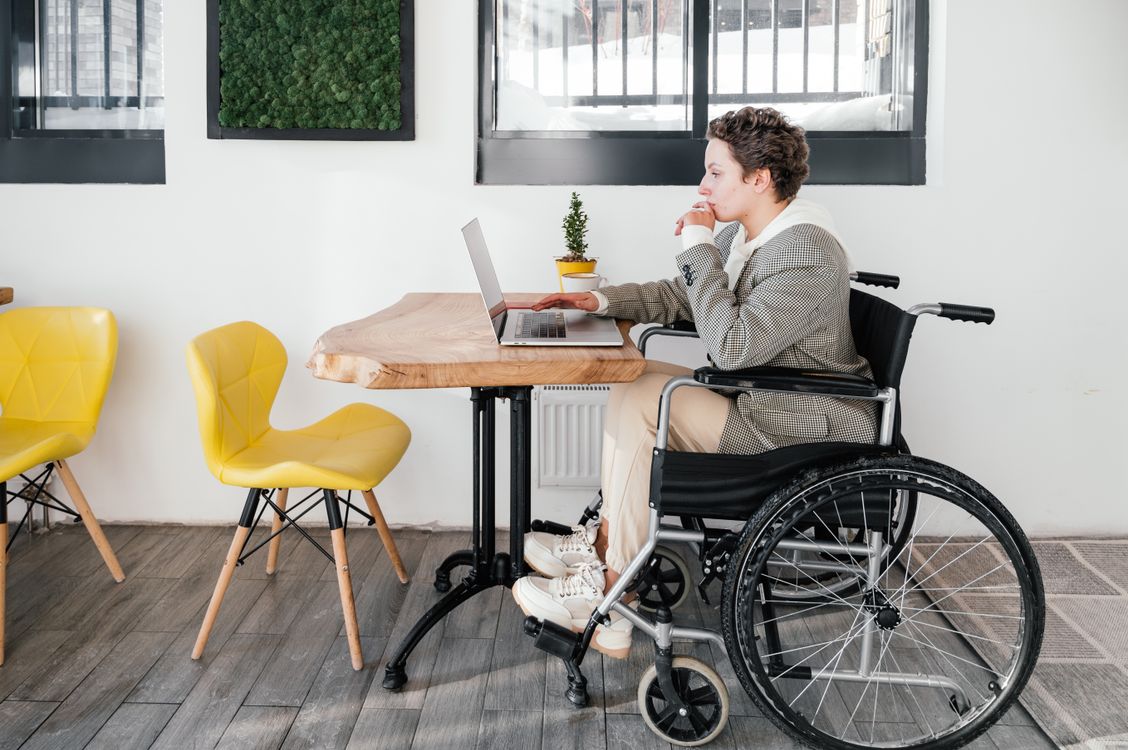
When people search for a wheelchair-accessible desk, the first question is often, “What height should the desk be?” It is an understandable starting point, but it is not the full answer.
A desk can technically be the right height and still feel uncomfortable, awkward or unusable for a wheelchair user. If there is not enough space underneath, if the frame blocks entry, or if cables and storage trays get in the way, the user may still have to lean forward, twist their shoulders or sit too far from the work surface.
A truly wheelchair-accessible desk is not defined by height alone. It depends on clearance, frame design, reach, posture and how easy the desk is to use every day.
Height Is Not the Main Factor
Desk height matters, but it should be treated as one part of a wider accessibility picture.
A correct height can still be inaccessible
A fixed desk may look suitable from the outside, but the real test is whether the wheelchair user can move close enough to work comfortably. If the armrests, footrests or joystick controls cannot fit beneath the surface, the user may be pushed too far away from the keyboard, notebook or screen.
This can lead to forward leaning, raised shoulders and unnecessary strain during longer work sessions.
Accessibility depends on the user and the wheelchair
Wheelchairs vary significantly. Manual wheelchairs, powered wheelchairs and chairs with larger footplates or joystick controls may all require different amounts of space.
The U.S. Access Board’s guidance on knee and toe clearance highlights the importance of clear floor space, knee space and toe space rather than focusing only on surface height.
This is why measuring the user’s seated position and wheelchair dimensions is more useful than relying on a generic desk-height number.
Under-Desk Clearance Is Critical
For wheelchair users, what happens beneath the desk is often more important than what happens above it.
Enough space for wheelchair entry
The user should be able to approach the desk and sit close enough that their elbows can remain relaxed while working. If they have to stretch forward to reach the keyboard or writing surface, the desk is not supporting good ergonomics.
There should be enough width and depth for the wheelchair to enter naturally without the wheels, footrests or frame colliding with the desk legs.
Room for footrests and joysticks
Footrests are easy to overlook, but they can be the part of the wheelchair that reaches furthest beneath the desk. Powered wheelchair users may also need extra room for joystick controls or side-mounted components.
A desk that has a low modesty panel, central beam or bulky drawer directly underneath may reduce usable clearance even if the desktop height seems appropriate.
Comfortable working posture
The Health and Safety Executive’s guidance on good workstation posture recommends keeping the keyboard just below elbow height and avoiding raised shoulders. For wheelchair users, this depends on both the desk height and how close the chair can move beneath the surface.
If the user cannot get close enough, they may compensate through the neck, back and shoulders.
--altImgStart--{"link":"https://s3.springbeetle.eu/prod-eu-s3/commodity/item/image_20260709_f90rj4bb.png","alt":"Premium Standing Desk Series (E7 Series 2026)"}--altImgEnd--
Desk Frame Design Matters More Than Expected
The frame design can determine whether a desk feels accessible in real life.
T-leg and C-leg frames
A T-leg desk places the main support centrally beneath the desktop, while a C-leg desk positions the support further back. Both can work, but the best choice depends on wheelchair type, approach angle and the user’s preferred working position.
A C-leg design may provide a more open front area because the frame sits further towards the rear. A T-leg design can still be suitable when it provides enough unobstructed space beneath the surface.
Crossbars and support beams
Crossbars can improve desk stability, but their location matters. A rear crossbar is usually less intrusive than one positioned where the user’s knees, footrests or controls need to go.
Before choosing a desk, check whether any frame parts, support bars or panels reduce the usable space beneath the desktop.
Cable trays and accessories
Cable trays, power blocks and under-desk drawers can accidentally make an accessible desk less usable. They may hang down into the knee area or block the wheelchair from moving close enough.
Cable management is still important, but it should be placed towards the back or side of the desk so that it does not reduce essential clearance.
Why Height Adjustable Desks Offer Better Compatibility
A fixed desk may suit one user at one moment, but it offers limited flexibility.
Better fit for different wheelchair types
A height-adjustable desk can adapt to different seated heights, cushions, wheelchair models and posture needs. This is especially valuable in shared workspaces or homes where needs may change over time.
The FlexiSpot T-leg Desk E7 has a height range of 63.5 to 128.5 cm, making it suitable for users who need broad sit-stand adjustability and a flexible height-adjustable desk setup.
Long-term flexibility
Accessibility needs are not always fixed. A user may change the wheelchair, add a pressure-relief cushion, alter seating posture or share the workstation with someone else.
A height-adjustable desk helps avoid replacing the entire setup when those needs change.
Minimum height matters more than maximum height
For many wheelchair users, the minimum height is more important than the maximum height. If the desk cannot lower enough, the user may need to raise their shoulders, reach upwards or position their arms awkwardly.
The FlexiSpot C-leg Desk E7 Pro has a lower stated height range of 58 to 123 cm, making it worth considering where a lower starting point is important.
Think Beyond the Main Desk
A completely accessible workspace often includes more than one surface.
Mobile side support
A separate side table can help keep frequently used items close without overcrowding the main desk. This may include a phone, notebook, drink, medication, charger, or assistive device.
The FlexiSpot Mobile Side Desk H3 can be used as an additional surface beside a wheelchair or main workstation, helping reduce unnecessary reaching during the day.
Tilted work surfaces
For some users, a flat desktop is not always the most comfortable option. Reading, writing, sketching or close-up tasks may require forward leaning, especially for users with limited upper-body strength.
An electric height-adjustable desk with a tilt angle can bring the work surface closer to the user’s natural line of sight. This may reduce forward leaning and improve arm comfort during reading, writing or focused manual tasks.
The key is to choose a setup that supports the task rather than forcing the body to adapt to the furniture.
--altImgStart--{"link":"https://s3.springbeetle.eu/prod-eu-s3/commodity/item/Screenshot%202026-07-09%20104634_20260709_7V6ot00u.png","alt":"Premium Standing Desk Series (E7 Series 2026), Multi-functional Adjustable Side Table H3 (H3)"}--altImgEnd--
Practical Checklist Before Buying
Measure the wheelchair and user together
Measure seated elbow height, knee height, footrest depth, wheelchair width and the space needed for controls. These measurements are more useful than relying on average desk recommendations.
Check the underside, not just the product's title
Look for crossbars, drawers, cable trays and frame parts that may block access. A desk described as adjustable is not automatically wheelchair accessible.
Test reach and visibility
The user should be able to reach the keyboard, mouse, writing surface and essential items without leaning forward excessively. The monitor should also be positioned so the neck remains comfortable.
Leave enough room around the desk
Accessibility does not stop at the desk edge. There should be enough surrounding space for approaching, turning and leaving the workstation safely.
Final Thoughts
Choosing a wheelchair-accessible desk begins with height, but it should never end there. The more important question is whether the user can comfortably fit beneath the desk, reach the work surface, maintain a relaxed posture and use the space without obstruction.
Under-desk clearance, frame design, crossbar placement, cable management and minimum height all influence real-world usability. Height-adjustable desks can offer greater compatibility because they adapt to different wheelchairs, postures and long-term needs.
The best accessible desk is not simply one that moves up and down. It is one that allows the user to work comfortably, independently and with fewer unnecessary physical compromises.
--shopstart--{"id":160001,"link":160001,"name":"Standing Desk with Enhanced Stability","shortName":"E7 PRO 2026","url":"//s3.springbeetle.eu/prod-eu-s3/trantor/attachments/UK/ET223(IB)-HD-ZX -E7P-Main.png","itemFootMarkType":"DISCOUNT","itemFootMarkInput":"15-Day Sale"}--shopend-- --shopstart--{"id":746013,"link":746013,"name":"Multi-functional Adjustable Side Table H3","shortName":"H3","url":"//s3.springbeetle.eu/prod-eu-s3/trantor/attachments/UK/H3新首页图.png","itemFootMarkType":"NONE","itemFootMarkInput":"CLEARANCE"}--shopend--


_20260602_cc9a7609.png)


