


A standing desk is designed to make your workday more flexible, not more frustrating.
So when it suddenly stops responding, moves unevenly, or displays an unfamiliar error code, it can interrupt your entire workflow. The good news is that most of these problems are not serious faults. In many cases, the desk simply needs to be reset or checked for a basic issue.
According to the Health and Safety Executive, maintaining properly functioning workstation equipment is essential for both comfort and injury prevention in daily work environments.
This guide explains why standing desks stop working properly, how to reset them safely, and what to do if the problem continues.
Why Standing Desks Need Resetting
Standing desks rely on motors, sensors, and control systems to move smoothly between positions.
When something interrupts that system, the desk may stop working correctly as a safety measure. This is often built into the design to protect both the user and the internal components.
Common causes include:
- Power interruptions
- Overloading the desk
- Continuous use without rest
- Obstructions during movement
- Misalignment between the lifting columns
Resetting allows the desk to recalibrate and return to normal operation.
Common Problems and What They Mean
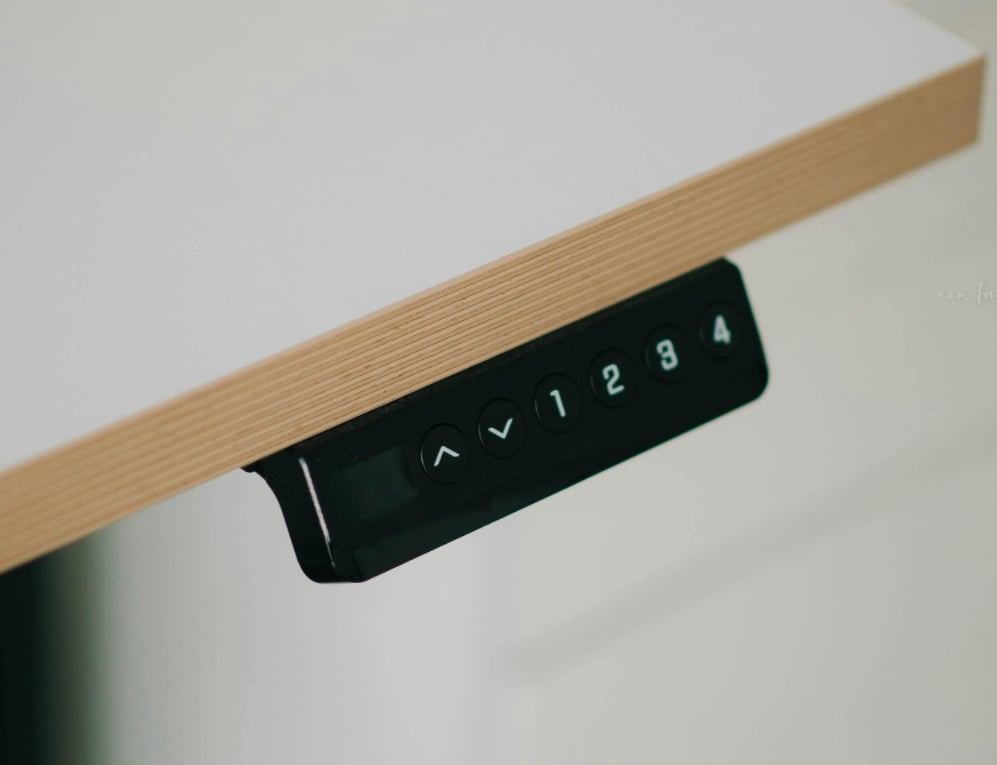
➢ Keypad not responding
If the buttons are not working, the issue is often electrical rather than mechanical. Loose or disconnected cables are the most common cause.
➢ Desk moves slowly
A slow ascent usually indicates that the desk is carrying too much weight. Exceeding the recommended load can affect motor performance.
➢ Desk only moves up or down
If movement is limited to one direction, the control system may need to be reset to restore full function.
➢ Desk does not reach full height
This can happen when the lifting columns become out of sync or detect resistance during movement.
➢ Desk stuck at lowest position
This often means the desk has entered a protection or reset state and needs to be reinitialised.
➢ Desk moves in the wrong direction
If the desk rises when you press down, it may be detecting an obstruction or misreading its position.
➢ Error codes on the display
Error codes are built-in safety indicators. They help prevent damage by stopping the desk when something is wrong.
How to Reset a Standing Desk
Resetting your desk is usually simple and takes only a few minutes.
Step-by-step reset guide
- Remove any objects from under the desk
- Press and hold the down button
- Continue holding until the desk reaches its lowest position
- Keep holding until the desk slightly dips and stops
- Wait for the display to return to normal
- Release the button and test movement
If the desk moves normally after this, the reset is complete.
If not, unplug the desk, wait a few seconds, reconnect it, and repeat the process.

Understanding Error Codes
RST: Reset mode
This indicates the desk has entered a self-protection state.
Solution:
● Clear any obstructions
● Hold the down button until the reset completes
E01 / E02: Overuse or overheating
These codes appear when the desk has been used continuously for too long.
Solution:
● Allow the desk to rest for around 15 to 20 minutes
● Restart after the rest period
Standing desks operate on a duty cycle. This means they require short rest periods to prevent overheating.
E03 / E04 / OL: Overload
This indicates that the desk is lifting more weight than it is designed to handle.
Solution:
● Remove excess weight from the desktop
● Restart the desk
E07 to E23: Motor issues
These codes point to problems with the motor or internal wiring.
Steps:
● Perform a reset
● Check all cable connections
● Swap motor connections if necessary to identify faults
If the issue remains, a motor or control box replacement may be required.
E09: Uneven legs
This happens when the desk legs are no longer aligned.
Solution:
● Reset the desk fully
● Ensure weight is evenly distributed across the surface
E30: Control system error
This indicates an issue within the control box.
Checklist:
● Confirm power connection
● Check all cables
● Perform a reset
● Allow sufficient rest time
● Remove any obstructions
How to Prevent Standing Desk Issues
Respect the weight limit
Overloading is one of the most common causes of failure. Always stay within the recommended capacity of your height adjustable desk.
Avoid constant adjustments
Give the motor time to complete each movement before making another adjustment. Continuous use without pauses can trigger safety shutdowns.
Keep the movement area clear
Ensure there are no objects under or around the desk that could interfere with its movement.
Perform regular maintenance
Check your desk periodically:
- Tighten screws
- Inspect cables
- Clean the lifting columns
Regular equipment maintenance is also recommended in workplace ergonomics guidance from Ergonomics Society, which highlights the importance of keeping adjustable workstations in good condition for safe use.
Fixing an Unstable Standing Desk
If your desk feels unstable, especially at higher positions, the issue is usually structural.
Check the following:
- Screws securing the feet
- Frame connections on both sides
- Screws attaching the desktop
Also make sure the desk is placed on a level surface. Even slight unevenness can affect stability.
What to Do If Resetting Fails
If your desk still does not work after resetting:
- Double-check all connections
- Ensure the desk is not overloaded
- Perform a full power reset by unplugging and reconnecting
If the issue continues, contact customer support with:
- Your desk model
- A clear description of the issue
- Any error codes shown
For general workplace setup and equipment troubleshooting, guidance from British Safety Council also recommends reporting persistent equipment faults to the manufacturer or support team.
Most problems can be resolved quickly once properly diagnosed.

Practical Tips to Extend Lifespan
● Use the desk with balance
Frequent use is fine, but avoid excessive adjustments in short periods.
● Keep weight evenly distributed
Uneven loads can strain one side of the desk and affect alignment.
● Maintain a clean setup
Dust and debris can interfere with moving parts over time.
Conclusion
A standing desk that stops working can feel like a major disruption, but most issues are simple to fix.
In many cases, a reset is all it takes to restore normal function. By understanding how your desk works, recognising common problems, and maintaining it properly, you can avoid unnecessary interruptions.
A well-maintained standing desk should remain smooth, stable, and reliable, supporting your workday without getting in the way.


_20260602_cc9a7609.png)


